
How Loud Is Your PC? What Decibels Really Mean for Your Computer’s Sound
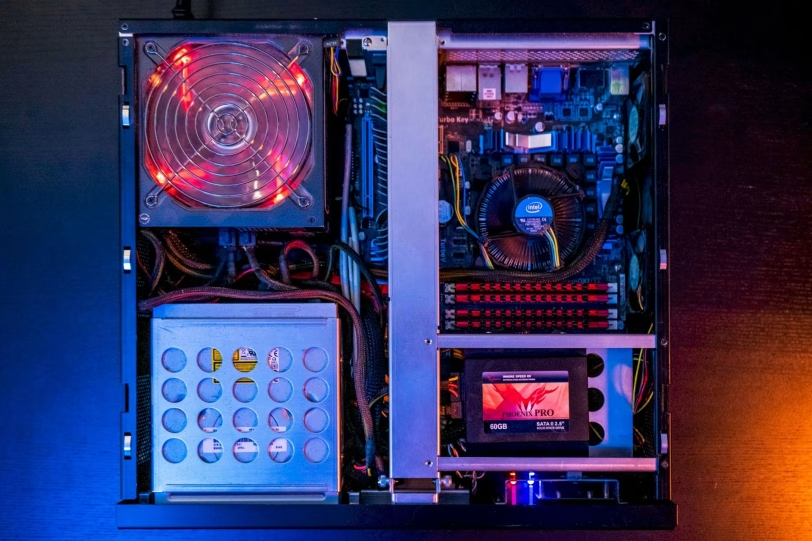
When we have an old PC, whether it’s a laptop or a desktop, we always say that “it’s very noisy”, but where does this noise come from? Computers emit sound that can be expressed in decibels. If we are lovers of quiet spaces we will try to look for a computer that makes little noise, if we do not mind, we can choose a good noise-canceling headset and play. But what are dBAs and how do they influence PC noise?
Before we start analysing the noise of our PC, let’s see what dB is, and specifically what concerns us, dB(A) or dBA. These are a unit that expresses the relationship between sound pressure and electrical power. In addition to the noise level, this measurement is used in other fields to precisely express the studied and reference magnitude.
The decibel receives a prefix that divides the basic scale that is the belium. The belium is the logarithmic unit that expresses the relationship between the two values of magnitude such that L=log10(P2/P1) while the decibel divides by 10 this logarithmic expression such that 1 belium is 10 dB. This expression means that every time we multiply the power of a sound by 10, the dB increases by 10. So a sound of 20 dB will be 100 times louder than a sound of 10 dB, a sound of 30 dB will be 1,000 times louder, etc.
But these complicated numbers aside, decibel is used instead of belium as it has a smaller measurement that better represents the hearing capabilities of the human ear. To give you an idea, a sound above 70 dB is considered dangerous and annoying, hurting above 120 dB. Below 70 dB is safe, although according to the WHO a noise of 55 dB is normal for our ears.
As a curiosity, let’s see the amount of dB that different situations can emit that we have surely been exposed to at some point.
- 0 Sound Threshold
- 20 Tick Tac of a Clock
- 30 Falling leaves, whisper
- 30 – 50 Average noise from a room
- 60 Background Music
- 70 Average noise in an office
- 80 Noise inside an airplane, electric vacuum cleaner
- 85 Traffic in a city (inside a vehicle), noise in a restaurant
- 90 Hair Dryer
- 95 Food Processor, Rooster’s Song
- 95 – 100 Subway train approaching, car horn about 5 meters away
- 100 Motorcycle, Hand Dryer
- 105 – 110 Noise in a bar, leaf blower with gasoline engine
- 110 Trombone, dog barking in your ear
- 110 – 120 Rock or pop music concert, mermaid
- 130 Air Hammer
- 135 Jet engine at 90 meters
- 140 Shot
- 142.2 Guinness World Record for noise in a stadium
But we will focus on how dB influences PC noise, for this dB(A) are used. But what are these dBAs? dB(A) is a measure used in telecommunications, specifically these are adjusted to the A weight. A-weighting involves applying a filter to the noise to remove some of the low frequencies and also those that are too high. By eliminating these frequencies we are left with the most harmful part for the human ear.
Thus, dBA expresses more specifically the relationship between sound pressure and electrical power harmful to humans as a preventive measure against hearing risk. This is the expression that we will usually find to know the noise of the different electrical components that generate noise in a PC. Let’s see what they are.
Components that generate noise in a PC
When we talk about noise in a PC, the first thing that comes to mind are the fans. We agree that these are the main causes of noise from our PC, whether desktop or laptop, but there are also other factors that interfere and that can make this almost indispensable element generate more or less noise. In addition, there are other elements that generate noise, although not many more.
We are going to review all the elements prone to generate noise, either to a greater or lesser extent.
Ventilators
These are a crucial element when it comes to expelling the interior heat from our desktop or laptop PC. They are also present in other devices for the same function, and which can be PC or video game consoles, printers and 3D printers, air cooling, RL AiO radiators, power supplies, graphics cards, etc.
Fans are, as we have mentioned, an indispensable element to expel heat from devices or to cool the heatsinks that are usually included in some components. They are also commonly found in desktop PC cases, helping to create a continuous airflow that improves the overall temperature of all components.
When we are going to buy new ones, or some component that includes them, we can know the maximum or the range in which they work. For this we will have to resort to the technical specifications of each device that includes them or of the fans themselves.
Liquid cooling pumps
These pumps also emit noise as they have a mechanism that propels the coolant. It does not matter if the pump is in the head, as is common in RL AiO, or if it is in the coolant tank as is often the case in custom RLs.
In the specifications we must find those emitted by the bomb, and which are generally expressed at full load. This will indicate the maximum noise it makes, generally being less than it in its usual operation.
Mechanical hard drives
Although HDDs are slowly disappearing in favor of SSDs, we can still find some computers that feature mechanical hard drives. These have the particularity of having moving parts that in the end make noise. With each reading and/or writing process, the head moves and therefore the motor that pushes it, also when starting a hard drive, the different platters that it has begin to spin, an action that also raises the noise of your PC.
This is not a measurement that is usually announced by the manufacturer, although the noise generated is also much lower than that of the other previous cases.
Electrical noise
This type of electrical noise is also called Coil Whine, and as its name indicates, it is not a mechanical noise. It is caused by electrical overload when components are usually subjected to a heavy load. It can generally be seen in graphics cards and power supplies, which are the components that support the greatest electrical load in a PC. If we talk about a laptop, this can also be seen (although it is very rare) in the power adapter.
As it is not common, this noise is not expressed by manufacturers with the dBA that it can reach. Just like in hard drives, this Coil Whine emits very few dBA and we can’t consider it something to consider.
In addition to these, few other components can generate noise.
Factors that influence noise
All these components that generate noise can do so to a greater and lesser extent, everything will depend on some factors that we are going to see below.
The main factor that increases noise is the load. The more we load a computer, whether laptop or desktop, the more heat it generates and therefore it will also have to dissipate this heat faster. For this, the fans run at higher rpm and the pump will have to push the coolant faster. This translates into more noise overall.
Fans have an operating range, depending on the use, quality and even their construction, they can generate more or less noise for the same function. A basic rule of thumb is that the larger the size, the fewer turns it will need to push the same amount of air. With a lower speed the noise generated is lower.
In addition, they can also be controlled by PWM, this will allow the rotation (or RPM) to be adapted to the current load of the equipment. Some fans can even stop running completely when the load is very low, staying at 0.
With a higher workload, there is also a greater chance that electrical noise or Coil Whine will appear. When we force the power supply, the graphics card, or any other component prone to this type of noise, it can be more likely to originate than if you work at rest or more relaxed.
We can also remedy it to make your PC quieter, although it is practically impossible to prevent it from being set to 0. If you are curious to know how much noise your laptop or desktop PC generates, you have applications for your mobile phone that measure this, some of the best known are Sound Level Meter – Decibels, Decibel X: dBA Sound Level Meter Pro or Decibel Meter: Sound Meter App. The sound level meter that gives its name to some of these applications is the device used to measure sound pressure, that is, the noise level.
If you have a noisy PC we can remedy it, although if it is a laptop we can do little.
dBA and how to reduce it on your PC
We’ll start with the simplest solution if you have a laptop. In this case, if your laptop accelerates the fans early and you notice that too much heat is coming out of the exhaust slots, it would be advisable to clean and/or change the thermal paste, thermal pads, etc.
To do this, we simply have to open the laptop, disassemble the board and change the thermal paste of the CPU and GPU if it has a dedicated one. It is also possible that you have some heating pads for the VRMs or other components prone to heat up more than necessary, we must replace them to ensure that the cooling is optimal at all times.
We have to say that this process is not easy at all, and that each laptop is different and has a way of disassembling it. If you are not qualified for this task, you can take it to a store or workshop where they carry out this process.
This procedure is also valid for a MiniPC, although these are usually more easily disassembled and therefore easier to carry out this maintenance.
If you have a desktop PC there are many options to lower the level of sound generated.
PC cases typically have fans to generate a continuous flow of air, which helps remove interior heat. Fans make more noise depending on many factors. If the ones you have are noisy, noisy, you can change them for others that have a lower dBA level. You can also choose larger ones that need fewer turns and therefore less noise.
Another cheaper option is to clean your fans.
You can eliminate noise by switching from an air cooler to a liquid cooler or a cooler with a quieter fan. Even some tower heatsinks feature standard 120mm fans, allowing you to switch directly from one to the other.
If you are going to switch to an RL AiO make sure that the pump can also be controlled by PWM, this will allow that when it is not under load the noise generated is less. This option is also valid for fans, controlled by PWM will allow them to operate at lower RPM during normal use of the equipment.
Even most motherboard software allows you to create a curve adapted to each situation, so that when you need to power your PC, they also do it by eliminating heat. Optimizing the ventilation curve for the GPU will also help make your environment quieter. You can use any program that manages these parameters, whether it’s the manufacturer’s own or generic like MSI Afterburner.
Another option is to use a graphics card with passive cooling, something that is only seen in the oldest and lowest range models, forget about finding one like this with the RTX 50 Series or the new Radeon RX 9070 Series. If you have a multimedia equipment, it is an ideal option to relax the noise.
The power supply also usually has a fan to expel heat and maintain temperature. You can try cleaning the fan, although there are some models that are capable of self-cleaning, you can also think about changing to a quieter one, there are even passive ones for a zero noise level.
In general, it is also advisable to clean the entire PC, the accumulation of dust causes the components to heat up more, with the consequent extra effort to remove the heat compared to if our equipment is clean.
Reduces noise levels
With these simple tricks you can make your work, study or general stay environment quieter. Noise generates stress, anxiety and other alterations of the nervous system, so it is advisable to be in a pleasant place with a sound level even below the 50 db(A) recommended by the WHO. Follow these simple steps and you will achieve this goal that will help you with your daily well-being.
