
ATX vs Micro ATX: Choosing the Right Motherboard for Your PC Build
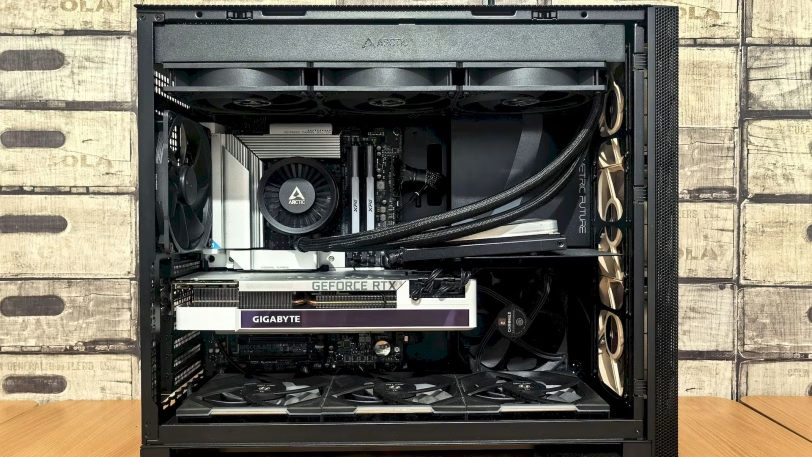
When building your PC you have many factors that you must take into account, mainly the use you are going to give to your computer. For this, you must choose your graphics card and a good processor that can match the tasks you are going to use it for. Another factor that is gaining strength lately is the size of our PC, for this we will have to decide between a micro ATX or ATX motherboard.
Users increasingly prefer a small construction, but without giving up the main features offered by a larger computer. We say the main ones because obviously there are limitations in choosing a PC of small dimensions, compared to one with a large case that can house large components. Although the main and most obvious advantage is size, there are other factors that can also determine or even convince you to choose one or the other.
Manufacturers also help to make this decision, making it easier to choose the most complicated option, which if we take space as the main factor will be the MicroATX. For this NVIDIA has released a seal called SFF, a seal that will not be necessary for larger builds, but that you should take into account if in the end you have decided on the smaller board along with an NVIDIA graphics card. SFF stands for Small Form Factor, where mid-range and even high-end graphics cards from Team Green have a more contained size that fit in smaller boxes.
Although SFF is a label intended for NVIDIA custom models, there are also small options from other manufacturers such as AMD with its Radeon or Intel with its Arc. In addition, there are also smaller boards, for example the Mini-ITX.
But not everything is reduced to a not too large graph, you should also take into account the height of the heatsink or the pump head if you choose RL AiO, the height of the RAM, space for extra units, etc.
But we are going to focus on offering you the differences or disadvantages when choosing a board, extending beyond the size of each one.
Differences and similarities between ATX vs Micro-ATX motherboards
Let’s start by reviewing the concepts of both. ATX is short for Advanced Technology Extended, a format that dates back to 1995 and was developed by Intel. ATX doesn’t just refer to motherboards, but also refers to Cases and Power Supplies. The ATX specs also give it a standard size of 305 x 244 mm or 12 x 9.6 inches.
MicroATX are similar to ATX, as the former were built to be compatible with the latter. Thus, MicroATX motherboards have a size of 244 x 244 mm or 9.6 x 9.6 inches. Thus, the MicroATX reduce their height while keeping the same width and therefore it has been possible to respect the same anchors that hold the motherboard to the ATX cases.
Another difference between ATX and MicroATX boards, even one of the most notable, is the number of PCI slots available to expand your PC with additional cards. The standard defines ATX with 7 available, while MicroATX will carry a maximum of 4, and that is usually reduced to 3 or even 2.
In the past, it was important to have multiple PCI slots available to add certain ports or peripherals that allowed you to expand your computer’s features. Nowadays we basically have all of this built into the motherboard, even the graphics are built into the CPU. But it doesn’t hurt to have at least one for a dedicated GPU and a free one for any other accessory or port we want to add.
Regarding deciding on Intel or AMD there is no problem, for both manufacturers and for their different sockets available there are surely options in both formats. This is where the advantages or disadvantages begin, which often resemble the similarities and differences between the two formats. Let’s look at some when choosing one format of shape or another.
Advantages and Disadvantages between choosing ATX or MicroATX
As we mentioned earlier, the main advantage of the Micro-ATX is the board size. For this one you will need a much smaller case, a case that can fit in more places since it usually occupies a much smaller volume than ATX board cases. We can opt for smaller constructions compared to the usual cases that comply with the ATX standard.
But this advantage also becomes a disadvantage, although it is not the subject at hand that is worth mentioning. It’s not that easy to find components that fit in a smaller box, especially if you’re looking for high-end or high-performance ones. In this aspect the ATX has an advantage since by using a larger case we also have room for larger components.
One of the advantages of ATX boards is the space available for later expansions. As we have seen above, the standard gives you a minimum of 7 PCIe slots available to insert cards, compared to the 4 of the Micro ATX. Nowadays this is not usually a problem, as they are not usually used as much as in the past where a sound card, a network card, a dedicated GPU, etc. were often installed. But if you have a specific need such as expanding space through M.2 SSD, you can connect several cards and with the ATX board you will have more space available.
In the mATX you will have to adapt to the ones it has, which as we have seen it is even common to lower them to 2 depending on the model. Many times it is enough for a graphics card next to a backup slot for possible and future updates, even so, this offers a disadvantage at least compared to the other larger model.
Adding another advantage to the larger slabs, we have variety. For plates with the larger standard of the two there are plenty of options available. Although they are all the same size, manufacturers differentiate the models according to whether they are oriented to gaming, office, work, graphic design, etc.
The variety for smaller constructions is more limited, although manufacturers have more and more models available, these are only a part of what we can find in the other format. To this we can also add the variety within the different chipset ranges available, if we are looking for a high-end chipset either from Intel or AMD the availability is even more reduced when we opt for a MATX board. Here we have to give the victory point to the ATX.
Due to the available space, we also find several limitations in terms of PC construction possibilities. In addition to having fewer PCI slots, it is also common to find less space for M.2 SSDs and even reduce from 4 to 2 slots for RAM memory. In ATX formats it is difficult to find boards with only two memory slots, and the possibilities for M.2 SSD disk on the board itself go up to 4 or 5 slots.
In addition, this extra space also allows you to add more connectors such as SATAs, or internal USBs that will allow you to use the front connections of the boxes, and power other hardware devices that often use these connections. With more space in an ATX system, you can also add better cooling and more fans if needed, a smaller space in smaller builds. It can also be a problem for the CPU to add a large heatsink in mATX cases, although there are low-profile options.
Another disadvantage of MATX is the ability to add more phases to a VRM system. The greater the number of phases, the more energy it is possible to supply more energy to the different components, this is ideal if we are going to install high-end components that usually have a higher consumption. The surface of a larger board itself allows for better distribution of the VRM and thus improves the stability of the system.
But not everything was going to be disadvantages, a smaller board together with a low-profile graphics card and a small case, allow you to install a PC system with many possibilities in your living room, without taking up much space. This will allow you to have a media server connected to a large screen that you can use for games, movies and series, browsing, etc. Its smaller size will go unnoticed, together with elegant aesthetic designs that you can find in terms of Micro ATX cases.
In addition, you can also install a MATX board in an ATX case, otherwise it will be impossible. If you already have your large box and your ideal board has the smallest format, you can add it to your box without any problem.
A cheaper price is also associated with MATX plates, these tend to have a lower price than the usual ones with a larger size. This is broadly speaking, since we are sure to find boards with a much higher cost than some ATX, this has to do with the chipset and the performance. But as a general rule, a smaller board is cheaper than larger motherboards.
So, what type of motherboard do I choose?
In short, if you have enough space, you plan to expand your PC in the future and you don’t care about the size of the case you can enjoy an ATX build. If, on the other hand, you prioritize the space consumed and you don’t mind reducing some features, a mATX construction is ideal.
Look for the ideal components, if you see that they can fit in a smaller case you can consider a smaller build, if you have no choice but to choose ATX you have already made the decision. But if your effort is to reduce the space needed for your PC, you can squeeze a little more out of your search, with the help of our price comparator, and look for smaller components that fit in your case. The search will be more complicated, but the result will surely be worth it.